
Visualisation#
A short tour of how to see a scenario: the plan (geometry, exits, journeys), an interactive replay of a run, and the two overlaid.
import jupedsim_scenarios as js
scenario = js.load_scenario("../assets/journeys.zip")
Run the simulation#
result = js.run_scenario(scenario=scenario)
INFO - Added DirectSteeringStage for checkpoint jps-checkpoints_0: time=0s
INFO - Added DirectSteeringStage for checkpoint jps-checkpoints_1: time=0s
INFO - Added DirectSteeringStage for checkpoint jps-checkpoints_2: time=0s
INFO - Added DirectSteeringStage for checkpoint jps-checkpoints_3: time=0s
INFO - Distribution jps-distributions_0 has 2 journey variants
INFO - Variant v2_journey-1779956316660-39ldcs: 8 agents (weight=83.0, total=100.0)
INFO - Variant v2_journey-1779956348421-vf4g0n: 2 agents (weight=17.0, total=100.0)
INFO - Total agents assigned: 10/10
Interactive playback#
result.visualise().show()
Plan vs. reality#
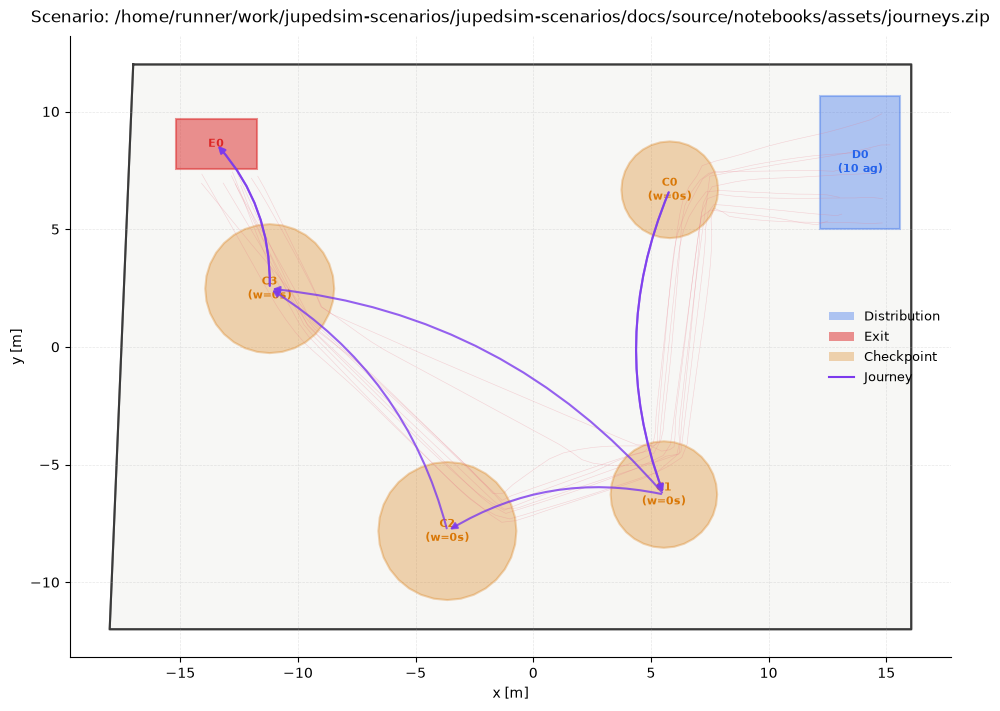
Pass trajectories=result to overlay the agent paths on the geometry — one figure showing the plan and what the agents actually did.
scenario.plot(show_journeys=True, trajectories=result)
<Axes: title={'center': 'Scenario: /home/runner/work/jupedsim-scenarios/jupedsim-scenarios/docs/source/notebooks/assets/journeys.zip'}, xlabel='x [m]', ylabel='y [m]'>