

How do I see what’s inside a scenario?#
A scenario bundles distributions (agent sources), zones
(speed-modifier regions), stages (waypoints / exits / queues), and
the simulation config. Every mutator you’ll use later
(set_agent_count, set_agent_params, set_zone_speed_factor, …)
needs the id of the thing you want to change.
Use list_distributions() / list_zones() / list_stages() to
discover those ids.
import logging
from datetime import datetime

# Silence jupedsim-scenarios' INFO/DEBUG output. See the howto
# "How do I inspect a scenario?" for the full list of levels.
logging.getLogger("jupedsim_scenarios").setLevel(logging.WARNING)

print(f"Executed on {datetime.now().strftime('%d.%m.%Y, %H:%M')}")

from jupedsim_scenarios import load_scenario

scenario = load_scenario("../assets/scenario.zip")
Executed on 05.09.2026, 10:21
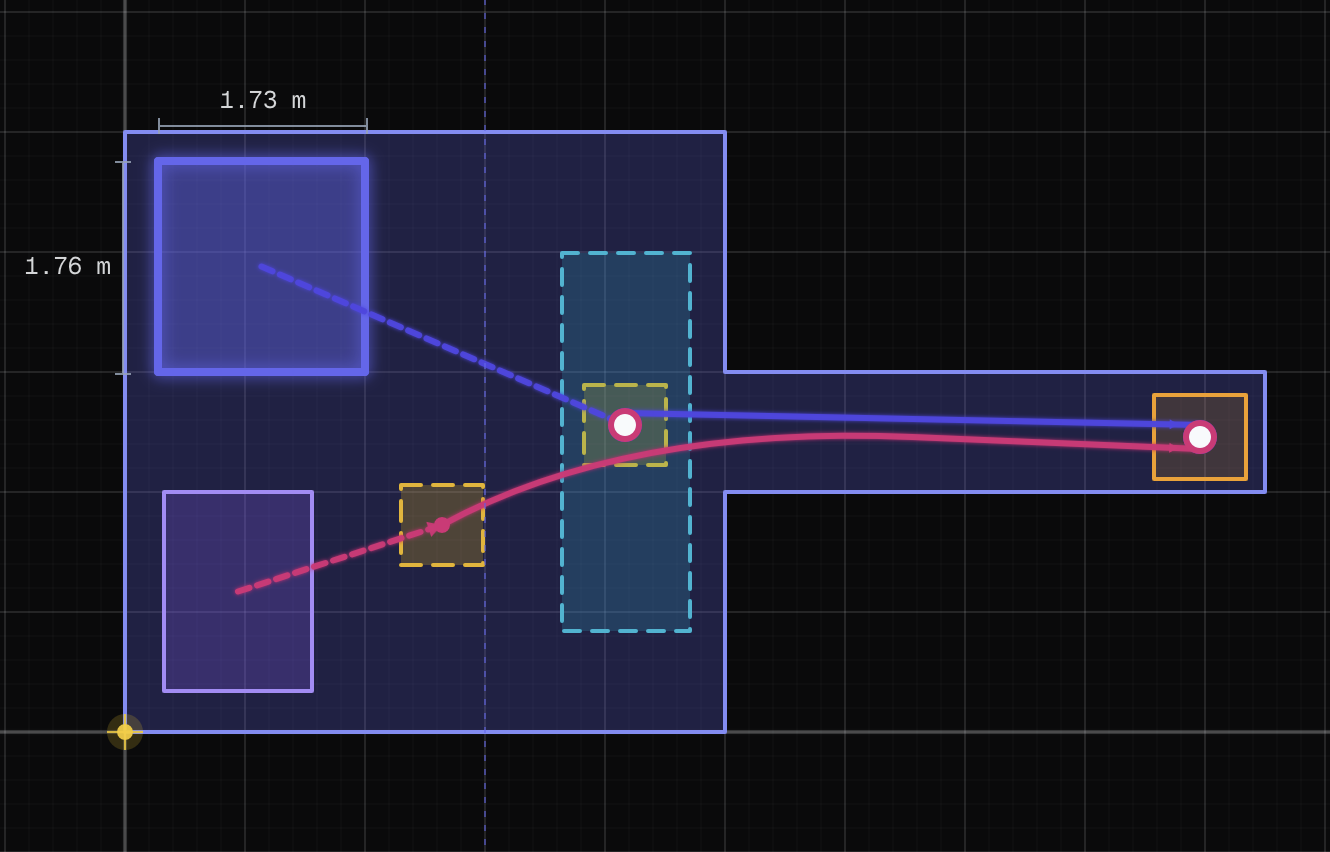
Layout of the example scenario: two distribution boxes (purple), a zone (cyan), and an exit (orange).
Distributions#
agent sources. Each has a string id and an index. Setters accept either.
scenario.list_distributions()
[{'index': 0, 'id': 'jps-distributions_0', 'agents': 3, 'flow': False},
 {'index': 1, 'id': 'jps-distributions_1', 'agents': 3, 'flow': False}]
Zones#
regions that modify agent speed (e.g. stairs, slow areas).
scenario.list_zones()
[{'index': 0, 'id': 'jps-zones_0', 'speed_factor': 1}]
Stages#
waypoints, exits, queues. Used in journeys.
scenario.list_stages()
[{'index': 0, 'id': 'jps-checkpoints_0', 'waiting_time': 0},
 {'index': 1, 'id': 'jps-checkpoints_1', 'waiting_time': 0}]
Why this matters#
Every mutator below takes a distribution_id, zone_id, or
stage_id. Pass either the string id ("jps-distributions_0") or
the integer index (0). The index form is handy when you don’t
care about the exact name:
scenario.set_agent_count(0, 50)              # by index
scenario.set_agent_count("jps-distributions_0", 50)  # by string id
Mutating a scenario — copy first when you want to keep the base#
Every setter and every attribute assignment mutates the Scenario
in place. That’s the right behaviour when you load a scenario to
run it, but it’s a footgun when you load a scenario as a base to
build variants on:
base = load_scenario(...)
base.seed = 99             # mutates `base` itself
base.set_agent_count(0, 50)  # also in place
Reach for .copy() before you mutate, so the original stays
reusable:
trial = base.copy()
trial.seed = 99
trial.set_agent_count(0, 50)
# base is untouched — reuse it for the next variant
run_sweep and run_sweep_from_factory copy per trial for you;
the pattern only comes up when you build variants by hand (see
11_sweep_via_copy).
Controlling log verbosity#
jupedsim-scenarios routes its diagnostic output through Python’s
standard logging module under the logger name
"jupedsim_scenarios". The library doesn’t configure handlers itself,
so by default Python only shows messages at WARNING or higher.
The first cell of every notebook in this guide pins the level explicitly so the output stays predictable:
import logging
logging.getLogger("jupedsim_scenarios").setLevel(logging.WARNING)
Choose the level that fits what you’re doing:
Level |
What you see |
When to use |
|---|---|---|
|
Only failures. |
Production-style runs; sweeps. |
|
Failures plus recoverable issues (default). |
Most notebook work. |
|
Above, plus operational facts: agents placed, fallback choices. |
Sanity-checking what the loader did. |
|
Above, plus per-distribution parameter dumps. |
Diagnosing why a scenario behaves unexpectedly. |
If you want the messages to actually appear, you also need a handler. The simplest one-liner adds a default stream handler with a basic format:
logging.basicConfig(level=logging.INFO)
Call it before importing jupedsim_scenarios for the cleanest
behavior.